

NumPy 快速入门#
先决条件#
你需要了解一些 Python 知识。要复习,请参阅 Python 教程。
要运行示例,除了 NumPy 之外,你还需要安装 matplotlib。
学习者画像
这是 NumPy 中关于数组的快速概述。它演示了 n 维(\(n>=2\))数组是如何表示和操作的。特别是,如果你不知道如何将常用函数应用于 n 维数组(而不使用 for 循环),或者你想理解 n 维数组的轴和形状属性,那么这篇文章可能会有所帮助。
学习目标
阅读后,你应该能够
理解 NumPy 中一维、二维和 n 维数组之间的区别;
理解如何不使用 for 循环将一些线性代数运算应用于 n 维数组;
理解 n 维数组的轴和形状属性。
基础知识#
NumPy 的主要对象是同质多维数组。它是一个由具有相同类型的元素(通常是数字)组成的表格,由非负整数组成的元组索引。在 NumPy 中,维度称为*轴*。
例如,三维空间中一个点的坐标数组 [1, 2, 1] 有一个轴。该轴包含 3 个元素,因此我们说它的长度为 3。在下图所示的示例中,数组有 2 个轴。第一个轴的长度为 2,第二个轴的长度为 3。
[[1., 0., 0.],
 [0., 1., 2.]]
NumPy 的数组类名为 ndarray。它也称为别名 array。请注意,numpy.array 与标准 Python 库类 array.array 不同,后者仅处理一维数组且功能较少。ndarray 对象最重要的属性是
- ndarray.ndim
数组的轴(维度)数量。
- ndarray.shape
数组的维度。这是一个整数元组,指示数组在每个维度上的大小。对于具有 *n* 行和 *m* 列的矩阵,
shape将为(n,m)。因此,shape元组的长度是轴的数量,即ndim。- ndarray.size
数组的总元素数。这等于
shape元素之积。- ndarray.dtype
描述数组中元素类型的对象。可以使用标准的 Python 类型创建或指定 dtype。此外,NumPy 还提供自己的类型。numpy.int32、numpy.int16 和 numpy.float64 是一些示例。
- ndarray.itemsize
数组中每个元素的大小(以字节为单位)。例如,类型为
float64的数组的itemsize为 8(=64/8),而类型为complex32的数组的itemsize为 4(=32/8)。它等同于ndarray.dtype.itemsize。- ndarray.data
包含数组实际元素的缓冲区。通常,我们不需要使用此属性,因为我们将使用索引机制访问数组中的元素。
示例#
>>> import numpy as np
>>> a = np.arange(15).reshape(3, 5)
>>> a
array([[ 0,  1,  2,  3,  4],
       [ 5,  6,  7,  8,  9],
       [10, 11, 12, 13, 14]])
>>> a.shape
(3, 5)
>>> a.ndim
2
>>> a.dtype.name
'int64'
>>> a.itemsize
8
>>> a.size
15
>>> type(a)
<class 'numpy.ndarray'>
>>> b = np.array([6, 7, 8])
>>> b
array([6, 7, 8])
>>> type(b)
<class 'numpy.ndarray'>
数组创建#
有几种方法可以创建数组。
例如,你可以使用 array 函数从常规的 Python 列表或元组创建数组。结果数组的类型是从序列中元素的类型推断出来的。
>>> import numpy as np
>>> a = np.array([2, 3, 4])
>>> a
array([2, 3, 4])
>>> a.dtype
dtype('int64')
>>> b = np.array([1.2, 3.5, 5.1])
>>> b.dtype
dtype('float64')
一个常见的错误是将 array 与多个参数一起调用,而不是提供单个序列作为参数。
>>> a = np.array(1, 2, 3, 4)    # WRONG
Traceback (most recent call last):
  ...
TypeError: array() takes from 1 to 2 positional arguments but 4 were given
>>> a = np.array([1, 2, 3, 4])  # RIGHT
array 将序列的序列转换为二维数组,将序列的序列的序列转换为三维数组,依此类推。
>>> b = np.array([(1.5, 2, 3), (4, 5, 6)])
>>> b
array([[1.5, 2. , 3. ],
       [4. , 5. , 6. ]])
数组的类型也可以在创建时显式指定
>>> c = np.array([[1, 2], [3, 4]], dtype=complex)
>>> c
array([[1.+0.j, 2.+0.j],
       [3.+0.j, 4.+0.j]])
通常,数组的元素最初是未知的,但其大小是已知的。因此,NumPy 提供了几个函数来创建具有初始占位符内容的数组。这最大限度地减少了扩展数组的需要,而扩展数组是一项昂贵的操作。
zeros 函数创建一个充满零的数组,ones 函数创建一个充满一的数组,empty 函数创建一个初始内容随机且取决于内存状态的数组。默认情况下,创建数组的 dtype 是 float64,但可以通过关键字参数 dtype 指定。
>>> np.zeros((3, 4))
array([[0., 0., 0., 0.],
       [0., 0., 0., 0.],
       [0., 0., 0., 0.]])
>>> np.ones((2, 3, 4), dtype=np.int16)
array([[[1, 1, 1, 1],
        [1, 1, 1, 1],
        [1, 1, 1, 1]],

       [[1, 1, 1, 1],
        [1, 1, 1, 1],
        [1, 1, 1, 1]]], dtype=int16)
>>> np.empty((2, 3))
array([[3.73603959e-262, 6.02658058e-154, 6.55490914e-260],  # may vary
       [5.30498948e-313, 3.14673309e-307, 1.00000000e+000]])
要创建数字序列,NumPy 提供了 arange 函数,它类似于 Python 内置的 range,但返回一个数组。
>>> np.arange(10, 30, 5)
array([10, 15, 20, 25])
>>> np.arange(0, 2, 0.3)  # it accepts float arguments
array([0. , 0.3, 0.6, 0.9, 1.2, 1.5, 1.8])
当 arange 与浮点数参数一起使用时,由于浮点数的有限精度,通常无法预测获得的元素数量。因此,通常最好使用 linspace 函数,该函数以我们想要的元素数量作为参数,而不是步长
>>> from numpy import pi
>>> np.linspace(0, 2, 9)                   # 9 numbers from 0 to 2
array([0.  , 0.25, 0.5 , 0.75, 1.  , 1.25, 1.5 , 1.75, 2.  ])
>>> x = np.linspace(0, 2 * pi, 100)        # useful to evaluate function at lots of points
>>> f = np.sin(x)
打印数组#
打印数组时,NumPy 的显示方式类似于嵌套列表,但具有以下布局
最后一个轴从左到右打印,
倒数第二个轴从上到下打印,
其余的也从上到下打印,每个切片之间用一个空行分隔。
一维数组打印为行,二维数组打印为矩阵,三维数组打印为矩阵列表。
>>> a = np.arange(6)                    # 1d array
>>> print(a)
[0 1 2 3 4 5]
>>>
>>> b = np.arange(12).reshape(4, 3)     # 2d array
>>> print(b)
[[ 0  1  2]
 [ 3  4  5]
 [ 6  7  8]
 [ 9 10 11]]
>>>
>>> c = np.arange(24).reshape(2, 3, 4)  # 3d array
>>> print(c)
[[[ 0  1  2  3]
  [ 4  5  6  7]
  [ 8  9 10 11]]

 [[12 13 14 15]
  [16 17 18 19]
  [20 21 22 23]]]
有关 reshape 的更多详细信息,请参阅 下方。
如果数组太大无法打印,NumPy 会自动跳过数组的中间部分,只打印角落。
>>> print(np.arange(10000))
[   0    1    2 ... 9997 9998 9999]
>>>
>>> print(np.arange(10000).reshape(100, 100))
[[   0    1    2 ...   97   98   99]
 [ 100  101  102 ...  197  198  199]
 [ 200  201  202 ...  297  298  299]
 ...
 [9700 9701 9702 ... 9797 9798 9799]
 [9800 9801 9802 ... 9897 9898 9899]
 [9900 9901 9902 ... 9997 9998 9999]]
要禁用此行为并强制 NumPy 打印整个数组,您可以使用 set_printoptions 更改打印选项。
>>> np.set_printoptions(threshold=sys.maxsize) # sys module should be imported
基本运算#
数组上的算术运算符*逐元素*应用。创建一个新数组并填充结果。
>>> a = np.array([20, 30, 40, 50])
>>> b = np.arange(4)
>>> b
array([0, 1, 2, 3])
>>> c = a - b
>>> c
array([20, 29, 38, 47])
>>> b**2
array([0, 1, 4, 9])
>>> 10 * np.sin(a)
array([ 9.12945251, -9.88031624,  7.4511316 , -2.62374854])
>>> a < 35
array([ True,  True, False, False])
与许多矩阵语言不同,NumPy 数组中的乘积运算符 * 是逐元素操作的。可以使用 @ 运算符(在 python >=3.5 中)或 dot 函数或方法执行矩阵乘法。
>>> A = np.array([[1, 1],
...               [0, 1]])
>>> B = np.array([[2, 0],
...               [3, 4]])
>>> A * B     # elementwise product
array([[2, 0],
       [0, 4]])
>>> A @ B     # matrix product
array([[5, 4],
       [3, 4]])
>>> A.dot(B)  # another matrix product
array([[5, 4],
       [3, 4]])
某些操作,例如 += 和 *=,会就地修改现有数组,而不是创建新数组。
>>> rg = np.random.default_rng(1)  # create instance of default random number generator
>>> a = np.ones((2, 3), dtype=int)
>>> b = rg.random((2, 3))
>>> a *= 3
>>> a
array([[3, 3, 3],
       [3, 3, 3]])
>>> b += a
>>> b
array([[3.51182162, 3.9504637 , 3.14415961],
       [3.94864945, 3.31183145, 3.42332645]])
>>> a += b  # b is not automatically converted to integer type
Traceback (most recent call last):
    ...
numpy._core._exceptions._UFuncOutputCastingError: Cannot cast ufunc 'add' output from dtype('float64') to dtype('int64') with casting rule 'same_kind'
当使用不同类型的数组进行运算时,结果数组的类型对应于更通用或更精确的类型(这种行为称为向上转型)。
>>> a = np.ones(3, dtype=np.int32)
>>> b = np.linspace(0, pi, 3)
>>> b.dtype.name
'float64'
>>> c = a + b
>>> c
array([1.        , 2.57079633, 4.14159265])
>>> c.dtype.name
'float64'
>>> d = np.exp(c * 1j)
>>> d
array([ 0.54030231+0.84147098j, -0.84147098+0.54030231j,
       -0.54030231-0.84147098j])
>>> d.dtype.name
'complex128'
许多一元运算,例如计算数组中所有元素的总和,都实现为 ndarray 类的*方法*。
>>> a = rg.random((2, 3))
>>> a
array([[0.82770259, 0.40919914, 0.54959369],
       [0.02755911, 0.75351311, 0.53814331]])
>>> a.sum()
3.1057109529998157
>>> a.min()
0.027559113243068367
>>> a.max()
0.8277025938204418
默认情况下,这些操作应用于数组,就像它是一个数字列表一样,而不管其形状如何。但是,通过指定 axis 参数,您可以沿着数组的指定轴应用操作。
>>> b = np.arange(12).reshape(3, 4)
>>> b
array([[ 0,  1,  2,  3],
       [ 4,  5,  6,  7],
       [ 8,  9, 10, 11]])
>>>
>>> b.sum(axis=0)     # sum of each column
array([12, 15, 18, 21])
>>>
>>> b.min(axis=1)     # min of each row
array([0, 4, 8])
>>>
>>> b.cumsum(axis=1)  # cumulative sum along each row
array([[ 0,  1,  3,  6],
       [ 4,  9, 15, 22],
       [ 8, 17, 27, 38]])
通用函数#
NumPy 提供了常见的数学函数,如 sin、cos 和 exp。在 NumPy 中,这些被称为“通用函数”(ufunc)。在 NumPy 中,这些函数在数组上逐元素操作,产生一个数组作为输出。
>>> B = np.arange(3)
>>> B
array([0, 1, 2])
>>> np.exp(B)
array([1.        , 2.71828183, 7.3890561 ])
>>> np.sqrt(B)
array([0.        , 1.        , 1.41421356])
>>> C = np.array([2., -1., 4.])
>>> np.add(B, C)
array([2., 0., 6.])
另请参阅
all, any, apply_along_axis, argmax, argmin, argsort, average, bincount, ceil, clip, conj, corrcoef, cov, cross, cumprod, cumsum, diff, dot, floor, inner, invert, lexsort, max, maximum, mean, median, min, minimum, nonzero, outer, prod, re, round, sort, std, sum, trace, transpose, var, vdot, vectorize, where
索引、切片和迭代#
**一维**数组可以像 列表 和其他 Python 序列一样进行索引、切片和迭代。
>>> a = np.arange(10)**3
>>> a
array([  0,   1,   8,  27,  64, 125, 216, 343, 512, 729])
>>> a[2]
8
>>> a[2:5]
array([ 8, 27, 64])
>>> # equivalent to a[0:6:2] = 1000;
>>> # from start to position 6, exclusive, set every 2nd element to 1000
>>> a[:6:2] = 1000
>>> a
array([1000,    1, 1000,   27, 1000,  125,  216,  343,  512,  729])
>>> a[::-1]  # reversed a
array([ 729,  512,  343,  216,  125, 1000,   27, 1000,    1, 1000])
>>> for i in a:
...     print(i**(1 / 3.))
...
9.999999999999998  # may vary
1.0
9.999999999999998
3.0
9.999999999999998
4.999999999999999
5.999999999999999
6.999999999999999
7.999999999999999
8.999999999999998
**多维**数组可以为每个轴提供一个索引。这些索引以逗号分隔的元组形式给出
>>> def f(x, y):
...     return 10 * x + y
...
>>> b = np.fromfunction(f, (5, 4), dtype=int)
>>> b
array([[ 0,  1,  2,  3],
       [10, 11, 12, 13],
       [20, 21, 22, 23],
       [30, 31, 32, 33],
       [40, 41, 42, 43]])
>>> b[2, 3]
23
>>> b[0:5, 1]  # each row in the second column of b
array([ 1, 11, 21, 31, 41])
>>> b[:, 1]    # equivalent to the previous example
array([ 1, 11, 21, 31, 41])
>>> b[1:3, :]  # each column in the second and third row of b
array([[10, 11, 12, 13],
       [20, 21, 22, 23]])
当提供的索引少于轴数时,缺失的索引被视为完整的切片:
>>> b[-1]   # the last row. Equivalent to b[-1, :]
array([40, 41, 42, 43])
b[i] 中的方括号表达式被视为 i,后跟任意数量的 : 以表示剩余的轴。NumPy 还允许你使用点来表示 b[i, ...]。
**点**(...)代表任意数量的冒号,直到生成一个完整的索引元组。例如,如果 x 是一个具有 5 个轴的数组,那么
x[1, 2, ...]等同于x[1, 2, :, :, :],x[..., 3]等同于x[:, :, :, :, 3],x[4, ..., 5, :]等同于x[4, :, :, 5, :]。
>>> c = np.array([[[  0,  1,  2],  # a 3D array (two stacked 2D arrays)
...                [ 10, 12, 13]],
...               [[100, 101, 102],
...                [110, 112, 113]]])
>>> c.shape
(2, 2, 3)
>>> c[1, ...]  # same as c[1, :, :] or c[1]
array([[100, 101, 102],
       [110, 112, 113]])
>>> c[..., 2]  # same as c[:, :, 2]
array([[  2,  13],
       [102, 113]])
对多维数组进行*迭代*是针对第一个轴进行的。
>>> for row in b:
...     print(row)
...
[0 1 2 3]
[10 11 12 13]
[20 21 22 23]
[30 31 32 33]
[40 41 42 43]
然而,如果想对数组中的每个元素执行操作,可以使用 flat 属性,它是一个*迭代器*,可以遍历数组的所有元素。
>>> for element in b.flat:
...     print(element)
...
0
1
2
3
10
11
12
13
20
21
22
23
30
31
32
33
40
41
42
43
另请参阅
ndarray 上的索引, 索引例程 (参考), newaxis, ndenumerate, indices
形状操作#
改变数组的形状#
数组的形状由每个轴上的元素数量给出。
>>> a = np.floor(10 * rg.random((3, 4)))
>>> a
array([[3., 7., 3., 4.],
       [1., 4., 2., 2.],
       [7., 2., 4., 9.]])
>>> a.shape
(3, 4)
可以使用各种命令更改数组的形状。请注意,以下三个命令都返回修改后的数组,但不会更改原始数组。
>>> a.ravel()  # returns the array, flattened
array([3., 7., 3., 4., 1., 4., 2., 2., 7., 2., 4., 9.])
>>> a.reshape(6, 2)  # returns the array with a modified shape
array([[3., 7.],
       [3., 4.],
       [1., 4.],
       [2., 2.],
       [7., 2.],
       [4., 9.]])
>>> a.T  # returns the array, transposed
array([[3., 1., 7.],
       [7., 4., 2.],
       [3., 2., 4.],
       [4., 2., 9.]])
>>> a.T.shape
(4, 3)
>>> a.shape
(3, 4)
ravel 产生的数组中的元素顺序通常是“C 风格”的,也就是说,最右边的索引“变化最快”,因此 a[0, 0] 之后的元素是 a[0, 1]。如果将数组重塑为其他形状,数组将再次被视为“C 风格”。NumPy 通常会创建以这种顺序存储的数组,因此 ravel 通常不需要复制其参数,但如果数组是通过切片另一个数组或使用非标准选项创建的,则可能需要复制。可以使用可选参数指示 ravel 和 reshape 函数使用 FORTRAN 风格的数组,其中最左边的索引变化最快。
reshape 函数返回其参数并修改形状,而 ndarray.resize 方法修改数组本身。
>>> a
array([[3., 7., 3., 4.],
       [1., 4., 2., 2.],
       [7., 2., 4., 9.]])
>>> a.resize((2, 6))
>>> a
array([[3., 7., 3., 4., 1., 4.],
       [2., 2., 7., 2., 4., 9.]])
如果在重塑操作中将维度指定为 -1,则其他维度将自动计算。
>>> a.reshape(3, -1)
array([[3., 7., 3., 4.],
       [1., 4., 2., 2.],
       [7., 2., 4., 9.]])
另请参阅
将不同数组堆叠在一起#
可以将多个数组沿不同轴堆叠在一起。
>>> a = np.floor(10 * rg.random((2, 2)))
>>> a
array([[9., 7.],
       [5., 2.]])
>>> b = np.floor(10 * rg.random((2, 2)))
>>> b
array([[1., 9.],
       [5., 1.]])
>>> np.vstack((a, b))
array([[9., 7.],
       [5., 2.],
       [1., 9.],
       [5., 1.]])
>>> np.hstack((a, b))
array([[9., 7., 1., 9.],
       [5., 2., 5., 1.]])
column_stack 函数将 1D 数组作为列堆叠到 2D 数组中。对于 2D 数组,它等同于 hstack。
>>> from numpy import newaxis
>>> np.column_stack((a, b))  # with 2D arrays
array([[9., 7., 1., 9.],
       [5., 2., 5., 1.]])
>>> a = np.array([4., 2.])
>>> b = np.array([3., 8.])
>>> np.column_stack((a, b))  # returns a 2D array
array([[4., 3.],
       [2., 8.]])
>>> np.hstack((a, b))        # the result is different
array([4., 2., 3., 8.])
>>> a[:, newaxis]  # view `a` as a 2D column vector
array([[4.],
       [2.]])
>>> np.column_stack((a[:, newaxis], b[:, newaxis]))
array([[4., 3.],
       [2., 8.]])
>>> np.hstack((a[:, newaxis], b[:, newaxis]))  # the result is the same
array([[4., 3.],
       [2., 8.]])
总的来说,对于维度大于 2 的数组,hstack 沿第二个轴堆叠,vstack 沿第一个轴堆叠,而 concatenate 允许使用可选参数指定要沿哪个轴进行连接。
注意
在复杂的情况下,r_ 和 c_ 对于通过沿一个轴堆叠数字来创建数组很有用。它们允许使用范围字面量 :。
>>> np.r_[1:4, 0, 4]
array([1, 2, 3, 0, 4])
当用数组作为参数使用时,r_ 和 c_ 在默认行为上类似于 vstack 和 hstack,但允许使用可选参数指定要沿哪个轴进行连接。
另请参阅
hstack, vstack, column_stack, concatenate, c_, r_
将一个数组分割成几个小的数组#
使用 hsplit,你可以沿着数组的水平轴将其分割,方法是指定要返回的等大数组的数量,或者指定分割后的列。
>>> a = np.floor(10 * rg.random((2, 12)))
>>> a
array([[6., 7., 6., 9., 0., 5., 4., 0., 6., 8., 5., 2.],
       [8., 5., 5., 7., 1., 8., 6., 7., 1., 8., 1., 0.]])
>>> # Split `a` into 3
>>> np.hsplit(a, 3)
[array([[6., 7., 6., 9.],
       [8., 5., 5., 7.]]), array([[0., 5., 4., 0.],
       [1., 8., 6., 7.]]), array([[6., 8., 5., 2.],
       [1., 8., 1., 0.]])]
>>> # Split `a` after the third and the fourth column
>>> np.hsplit(a, (3, 4))
[array([[6., 7., 6.],
       [8., 5., 5.]]), array([[9.],
       [7.]]), array([[0., 5., 4., 0., 6., 8., 5., 2.],
       [1., 8., 6., 7., 1., 8., 1., 0.]])]
vsplit 沿垂直轴分割,而 array_split 允许指定沿哪个轴进行分割。
复制和视图#
在操作和处理数组时,有时会将数据复制到新数组中,有时则不会。这通常是初学者感到困惑的根源。有三种情况:
完全不复制#
简单的赋值不会复制对象及其数据。
>>> a = np.array([[ 0,  1,  2,  3],
...               [ 4,  5,  6,  7],
...               [ 8,  9, 10, 11]])
>>> b = a            # no new object is created
>>> b is a           # a and b are two names for the same ndarray object
True
Python 按引用传递可变对象,因此函数调用不会复制。
>>> def f(x):
...     print(id(x))
...
>>> id(a)  # id is a unique identifier of an object
148293216  # may vary
>>> f(a)
148293216  # may vary
视图或浅拷贝#
不同的数组对象可以共享相同的数据。 view 方法创建了一个查看相同数据的新数组对象。
>>> c = a.view()
>>> c is a
False
>>> c.base is a            # c is a view of the data owned by a
True
>>> c.flags.owndata
False
>>>
>>> c = c.reshape((2, 6))  # a's shape doesn't change, reassigned c is still a view of a
>>> a.shape
(3, 4)
>>> c[0, 4] = 1234         # a's data changes
>>> a
array([[   0,    1,    2,    3],
       [1234,    5,    6,    7],
       [   8,    9,   10,   11]])
切片数组会返回它的一个视图。
>>> s = a[:, 1:3]
>>> s[:] = 10  # s[:] is a view of s. Note the difference between s = 10 and s[:] = 10
>>> a
array([[   0,   10,   10,    3],
       [1234,   10,   10,    7],
       [   8,   10,   10,   11]])
深拷贝#
copy 方法会完整地复制数组及其数据。
>>> d = a.copy()  # a new array object with new data is created
>>> d is a
False
>>> d.base is a  # d doesn't share anything with a
False
>>> d[0, 0] = 9999
>>> a
array([[   0,   10,   10,    3],
       [1234,   10,   10,    7],
       [   8,   10,   10,   11]])
有时在切片后应调用 copy,如果不再需要原始数组。例如,假设 a 是一个巨大的中间结果,而最终结果 b 只包含 a 的一小部分,那么在用切片构造 b 时应该进行深拷贝。
>>> a = np.arange(int(1e8))
>>> b = a[:100].copy()
>>> del a  # the memory of ``a`` can be released.
如果使用 b = a[:100] 代替,那么 b 将引用 a,即使执行了 del a,a 也会保留在内存中。
另请参阅 复制和视图。
函数和方法概述#
以下是按类别排序的一些有用 NumPy 函数和方法名称列表。有关完整列表,请参阅 按主题划分的例程和对象。
- 数组创建
arange、array、copy、empty、empty_like、eye、fromfile、fromfunction、identity、linspace、logspace、mgrid、ogrid、ones、ones_like、r_、zeros、zeros_like- 转换
- 操作
array_split、column_stack、concatenate、diagonal、dsplit、dstack、hsplit、hstack、ndarray.item、newaxis、ravel、repeat、reshape、resize、squeeze、swapaxes、take、transpose、vsplit、vstack- 查询
- 排序
- 运算
choose、compress、cumprod、cumsum、inner、ndarray.fill、imag、prod、put、putmask、real、sum- 基本统计
- 基本线性代数
较少基础#
广播规则#
广播允许通用函数有意义地处理形状不完全相同的输入。
广播的第一条规则是,如果所有输入数组的维度数不相同,则会在较小数组的形状前面反复添加“1”,直到所有数组都具有相同的维度数。
广播的第二条规则确保沿特定维度的尺寸为 1 的数组的行为,就好像它们在那个维度上具有最大形状的数组的尺寸一样。“广播”数组在该维度上假定其元素值相同。
应用广播规则后,所有数组的尺寸必须匹配。有关更多详细信息,请参阅 广播。
高级索引和索引技巧#
NumPy 提供了比常规 Python 序列更多的索引功能。除了之前看到的整数和切片索引外,还可以使用整数数组和布尔数组进行索引。
使用索引数组进行索引#
>>> a = np.arange(12)**2  # the first 12 square numbers
>>> i = np.array([1, 1, 3, 8, 5])  # an array of indices
>>> a[i]  # the elements of `a` at the positions `i`
array([ 1,  1,  9, 64, 25])
>>>
>>> j = np.array([[3, 4], [9, 7]])  # a bidimensional array of indices
>>> a[j]  # the same shape as `j`
array([[ 9, 16],
       [81, 49]])
当被索引的数组 a 是多维的时,单个索引数组会引用 a 的第一个维度。以下示例通过将标签图像转换为彩色图像并使用调色板来展示此行为。
>>> palette = np.array([[0, 0, 0],         # black
...                     [255, 0, 0],       # red
...                     [0, 255, 0],       # green
...                     [0, 0, 255],       # blue
...                     [255, 255, 255]])  # white
>>> image = np.array([[0, 1, 2, 0],  # each value corresponds to a color in the palette
...                   [0, 3, 4, 0]])
>>> palette[image]  # the (2, 4, 3) color image
array([[[  0,   0,   0],
        [255,   0,   0],
        [  0, 255,   0],
        [  0,   0,   0]],

       [[  0,   0,   0],
        [  0,   0, 255],
        [255, 255, 255],
        [  0,   0,   0]]])
我们还可以为多个维度提供索引。每个维度的索引数组必须具有相同的形状。
>>> a = np.arange(12).reshape(3, 4)
>>> a
array([[ 0,  1,  2,  3],
       [ 4,  5,  6,  7],
       [ 8,  9, 10, 11]])
>>> i = np.array([[0, 1],  # indices for the first dim of `a`
...               [1, 2]])
>>> j = np.array([[2, 1],  # indices for the second dim
...               [3, 3]])
>>>
>>> a[i, j]  # i and j must have equal shape
array([[ 2,  5],
       [ 7, 11]])
>>>
>>> a[i, 2]
array([[ 2,  6],
       [ 6, 10]])
>>>
>>> a[:, j]
array([[[ 2,  1],
        [ 3,  3]],

       [[ 6,  5],
        [ 7,  7]],

       [[10,  9],
        [11, 11]]])
在 Python 中,arr[i, j] 与 arr[(i, j)] 完全相同 — 因此我们可以将 i 和 j 放入一个 tuple 中,然后使用它进行索引。
>>> l = (i, j)
>>> # equivalent to a[i, j]
>>> a[l]
array([[ 2,  5],
       [ 7, 11]])
但是,我们不能通过将 i 和 j 放入数组来做到这一点,因为该数组将被解释为索引 a 的第一个维度。
>>> s = np.array([i, j])
>>> # not what we want
>>> a[s]
Traceback (most recent call last):
  File "<stdin>", line 1, in <module>
IndexError: index 3 is out of bounds for axis 0 with size 3
>>> # same as `a[i, j]`
>>> a[tuple(s)]
array([[ 2,  5],
       [ 7, 11]])
使用数组进行索引的另一个常见用途是搜索时间序列的最大值
>>> time = np.linspace(20, 145, 5)  # time scale
>>> data = np.sin(np.arange(20)).reshape(5, 4)  # 4 time-dependent series
>>> time
array([ 20.  ,  51.25,  82.5 , 113.75, 145.  ])
>>> data
array([[ 0.        ,  0.84147098,  0.90929743,  0.14112001],
       [-0.7568025 , -0.95892427, -0.2794155 ,  0.6569866 ],
       [ 0.98935825,  0.41211849, -0.54402111, -0.99999021],
       [-0.53657292,  0.42016704,  0.99060736,  0.65028784],
       [-0.28790332, -0.96139749, -0.75098725,  0.14987721]])
>>> # index of the maxima for each series
>>> ind = data.argmax(axis=0)
>>> ind
array([2, 0, 3, 1])
>>> # times corresponding to the maxima
>>> time_max = time[ind]
>>>
>>> data_max = data[ind, range(data.shape[1])]  # => data[ind[0], 0], data[ind[1], 1]...
>>> time_max
array([ 82.5 ,  20.  , 113.75,  51.25])
>>> data_max
array([0.98935825, 0.84147098, 0.99060736, 0.6569866 ])
>>> np.all(data_max == data.max(axis=0))
True
您还可以使用数组作为目标进行赋值
>>> a = np.arange(5)
>>> a
array([0, 1, 2, 3, 4])
>>> a[[1, 3, 4]] = 0
>>> a
array([0, 0, 2, 0, 0])
但是,当索引列表包含重复项时,会进行多次赋值,只留下最后一个值
>>> a = np.arange(5)
>>> a[[0, 0, 2]] = [1, 2, 3]
>>> a
array([2, 1, 3, 3, 4])
这足够合理,但如果想使用 Python 的 += 结构,请小心,因为它可能不会按预期工作
>>> a = np.arange(5)
>>> a[[0, 0, 2]] += 1
>>> a
array([1, 1, 3, 3, 4])
即使索引列表中有两个 0,第 0 个元素也只增加了一次。这是因为 Python 要求 a += 1 等同于 a = a + 1。
使用布尔数组进行索引#
当我们使用(整数)索引数组进行索引时,我们提供了要选择的索引列表。使用布尔索引时,方法不同;我们明确选择数组中我们想要的项目和不想要的项目。
使用布尔索引最自然的思考方式是使用与原始数组*形状相同*的布尔数组
>>> a = np.arange(12).reshape(3, 4)
>>> b = a > 4
>>> b  # `b` is a boolean with `a`'s shape
array([[False, False, False, False],
       [False,  True,  True,  True],
       [ True,  True,  True,  True]])
>>> a[b]  # 1d array with the selected elements
array([ 5,  6,  7,  8,  9, 10, 11])
此属性在赋值中非常有用
>>> a[b] = 0  # All elements of `a` higher than 4 become 0
>>> a
array([[0, 1, 2, 3],
       [4, 0, 0, 0],
       [0, 0, 0, 0]])
您可以通过以下示例查看如何使用布尔索引生成Mandelbrot 集的图像
>>> import numpy as np
>>> import matplotlib.pyplot as plt
>>> def mandelbrot(h, w, maxit=20, r=2):
...     """Returns an image of the Mandelbrot fractal of size (h,w)."""
...     x = np.linspace(-2.5, 1.5, 4*h+1)
...     y = np.linspace(-1.5, 1.5, 3*w+1)
...     A, B = np.meshgrid(x, y)
...     C = A + B*1j
...     z = np.zeros_like(C)
...     divtime = maxit + np.zeros(z.shape, dtype=int)
...
...     for i in range(maxit):
...         z = z**2 + C
...         diverge = abs(z) > r                    # who is diverging
...         div_now = diverge & (divtime == maxit)  # who is diverging now
...         divtime[div_now] = i                    # note when
...         z[diverge] = r                          # avoid diverging too much
...
...     return divtime
>>> plt.clf()
>>> plt.imshow(mandelbrot(400, 400))
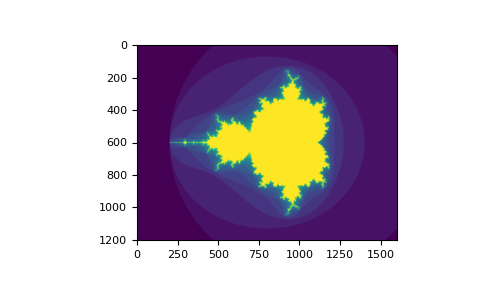
使用布尔值进行索引的第二种方式更类似于整数索引;对于数组的每个维度,我们提供一个 1D 布尔数组来选择我们想要的切片
>>> a = np.arange(12).reshape(3, 4)
>>> b1 = np.array([False, True, True])         # first dim selection
>>> b2 = np.array([True, False, True, False])  # second dim selection
>>>
>>> a[b1, :]                                   # selecting rows
array([[ 4,  5,  6,  7],
       [ 8,  9, 10, 11]])
>>>
>>> a[b1]                                      # same thing
array([[ 4,  5,  6,  7],
       [ 8,  9, 10, 11]])
>>>
>>> a[:, b2]                                   # selecting columns
array([[ 0,  2],
       [ 4,  6],
       [ 8, 10]])
>>>
>>> a[b1, b2]                                  # a weird thing to do
array([ 4, 10])
请注意,1D 布尔数组的长度必须与您要切片的维度(或轴)的长度一致。在前面的示例中,b1 的长度为 3(a 的*行数*),而 b2(长度为 4)适合索引 a 的第二个轴(列)。
ix_() 函数#
可以使用 ix_ 函数组合不同的向量,以便为每个 n 元组获得结果。例如,如果您想计算向量 a、b 和 c 中每个三元组的所有 a+b*c
>>> a = np.array([2, 3, 4, 5])
>>> b = np.array([8, 5, 4])
>>> c = np.array([5, 4, 6, 8, 3])
>>> ax, bx, cx = np.ix_(a, b, c)
>>> ax
array([[[2]],

       [[3]],

       [[4]],

       [[5]]])
>>> bx
array([[[8],
        [5],
        [4]]])
>>> cx
array([[[5, 4, 6, 8, 3]]])
>>> ax.shape, bx.shape, cx.shape
((4, 1, 1), (1, 3, 1), (1, 1, 5))
>>> result = ax + bx * cx
>>> result
array([[[42, 34, 50, 66, 26],
        [27, 22, 32, 42, 17],
        [22, 18, 26, 34, 14]],

       [[43, 35, 51, 67, 27],
        [28, 23, 33, 43, 18],
        [23, 19, 27, 35, 15]],

       [[44, 36, 52, 68, 28],
        [29, 24, 34, 44, 19],
        [24, 20, 28, 36, 16]],

       [[45, 37, 53, 69, 29],
        [30, 25, 35, 45, 20],
        [25, 21, 29, 37, 17]]])
>>> result[3, 2, 4]
17
>>> a[3] + b[2] * c[4]
17
您也可以像这样实现 reduce
>>> def ufunc_reduce(ufct, *vectors):
...    vs = np.ix_(*vectors)
...    r = ufct.identity
...    for v in vs:
...        r = ufct(r, v)
...    return r
然后像这样使用它
>>> ufunc_reduce(np.add, a, b, c)
array([[[15, 14, 16, 18, 13],
        [12, 11, 13, 15, 10],
        [11, 10, 12, 14,  9]],

       [[16, 15, 17, 19, 14],
        [13, 12, 14, 16, 11],
        [12, 11, 13, 15, 10]],

       [[17, 16, 18, 20, 15],
        [14, 13, 15, 17, 12],
        [13, 12, 14, 16, 11]],

       [[18, 17, 19, 21, 16],
        [15, 14, 16, 18, 13],
        [14, 13, 15, 17, 12]]])
与普通 ufunc.reduce 相比,此版本的 reduce 的优点在于它利用了 广播规则,从而避免创建输出大小乘以向量数量的参数数组。
使用字符串进行索引#
请参阅 结构化数组。
技巧和窍门#
在此提供一些简短实用的提示。
“自动”重塑#
要更改数组的维度,可以省略其中一个尺寸,该尺寸将自动推断
>>> a = np.arange(30)
>>> b = a.reshape((2, -1, 3))  # -1 means "whatever is needed"
>>> b.shape
(2, 5, 3)
>>> b
array([[[ 0,  1,  2],
        [ 3,  4,  5],
        [ 6,  7,  8],
        [ 9, 10, 11],
        [12, 13, 14]],

       [[15, 16, 17],
        [18, 19, 20],
        [21, 22, 23],
        [24, 25, 26],
        [27, 28, 29]]])
向量堆叠#
如何从一组等长行向量构造二维数组?在 MATLAB 中这很简单:如果 x 和 y 是两个相同长度的向量,只需输入 m=[x;y]。在 NumPy 中,这通过函数 column_stack、dstack、hstack 和 vstack 实现,具体取决于要堆叠的维度。例如
>>> x = np.arange(0, 10, 2)
>>> y = np.arange(5)
>>> m = np.vstack([x, y])
>>> m
array([[0, 2, 4, 6, 8],
       [0, 1, 2, 3, 4]])
>>> xy = np.hstack([x, y])
>>> xy
array([0, 2, 4, 6, 8, 0, 1, 2, 3, 4])
超过两个维度的这些函数的逻辑可能会有些奇怪。
另请参阅
直方图#
NumPy 的 histogram 函数应用于数组时,会返回一个由两部分组成的向量:数组的直方图和一组 bin 的边缘。注意:matplotlib 也有一个用于构建直方图的函数(称为 hist,类似于 Matlab),该函数与 NumPy 中的函数不同。主要区别在于 pylab.hist 会自动绘制直方图,而 numpy.histogram 只生成数据。
>>> import numpy as np
>>> rg = np.random.default_rng(1)
>>> import matplotlib.pyplot as plt
>>> # Build a vector of 10000 normal deviates with variance 0.5^2 and mean 2
>>> mu, sigma = 2, 0.5
>>> v = rg.normal(mu, sigma, 10000)
>>> # Plot a normalized histogram with 50 bins
>>> plt.hist(v, bins=50, density=True)       # matplotlib version (plot)
(array...)
>>> # Compute the histogram with numpy and then plot it
>>> (n, bins) = np.histogram(v, bins=50, density=True)  # NumPy version (no plot)
>>> plt.plot(.5 * (bins[1:] + bins[:-1]), n)
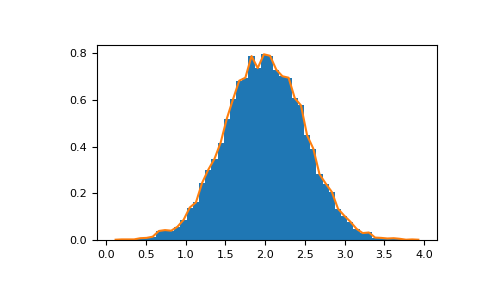
使用 Matplotlib >=3.4,您还可以使用 plt.stairs(n, bins)。