

如何创建具有规则间隔值的数组#
有几个 NumPy 函数在应用上很相似,但会产生略有不同的结果,如果使用不当可能会引起混淆。以下指南旨在列出这些函数并描述它们的推荐用法。
这里提到的函数是
一维域(区间)#
linspace 与 arange#
numpy.linspacenumpy.arange
如果您想要整数步长,请使用
numpy.arangenumpy.arangearangestep示例
>>> np.arange(0, 10, 2)  # np.arange(start, stop, step)
array([0, 2, 4, 6, 8])
startstopnumpy.arangerange浮点数的精度问题可能会使
arangenumpy.linspace如果您希望结果包含结束点,或者您正在使用非整数步长,请使用
numpy.linspacenumpy.linspacenum参数(指定返回数组中的元素数量)确定步长。结束点的包含由一个可选的布尔参数
endpointTrueendpoint=False示例
>>> np.linspace(0.1, 0.2, num=5)  # np.linspace(start, stop, num)
array([0.1  , 0.125, 0.15 , 0.175, 0.2  ])
>>> np.linspace(0.1, 0.2, num=5, endpoint=False)
array([0.1, 0.12, 0.14, 0.16, 0.18])
numpy.linspace>>> np.linspace(1+1.j, 4, 5, dtype=np.complex64) array([1. +1.j , 1.75+0.75j, 2.5 +0.5j , 3.25+0.25j, 4. +0.j ], dtype=complex64)
其他示例#
如果在
numpy.arangestep>>> list(np.arange(0.1,0.4,0.1).round(1)) [0.1, 0.2, 0.3, 0.4] # endpoint should not be included!
为
>>> list(np.arange(1, 4, 1) / 10.0)
[0.1, 0.2, 0.3]  # expected result
注意
>>> np.arange(0, 1.12, 0.04)
array([0.  , 0.04, 0.08, 0.12, 0.16, 0.2 , 0.24, 0.28, 0.32, 0.36, 0.4 ,
       0.44, 0.48, 0.52, 0.56, 0.6 , 0.64, 0.68, 0.72, 0.76, 0.8 , 0.84,
       0.88, 0.92, 0.96, 1.  , 1.04, 1.08, 1.12])
和
>>> np.arange(0, 1.08, 0.04)
array([0.  , 0.04, 0.08, 0.12, 0.16, 0.2 , 0.24, 0.28, 0.32, 0.36, 0.4 ,
       0.44, 0.48, 0.52, 0.56, 0.6 , 0.64, 0.68, 0.72, 0.76, 0.8 , 0.84,
       0.88, 0.92, 0.96, 1.  , 1.04])
这些结果不同是因为数值噪声。当使用浮点数时,
0 + 0.04 * 28 < 1.121.12>>> 1.12/0.04 28.000000000000004
但是
0 + 0.04 * 27 >= 1.08>>> 1.08/0.04 27.0
或者,您可以使用
np.arange(0, 28)*0.04>>> np.arange(0, 28)*0.04 array([0. , 0.04, 0.08, 0.12, 0.16, 0.2 , 0.24, 0.28, 0.32, 0.36, 0.4 , 0.44, 0.48, 0.52, 0.56, 0.6 , 0.64, 0.68, 0.72, 0.76, 0.8 , 0.84, 0.88, 0.92, 0.96, 1. , 1.04, 1.08])
geomspace 和 logspace#
numpy.geomspacenumpy.linspace
示例
>>> np.geomspace(2, 3, num=5)
array([2.        , 2.21336384, 2.44948974, 2.71080601, 3.        ])
numpy.logspacenumpy.geomspace
>>> np.logspace(2, 3, num=5)
array([ 100.        ,  177.827941  ,  316.22776602,  562.34132519, 1000.        ])
在线性空间中,序列以 base ** startbasestartbase ** stop
>>> np.logspace(2, 3, num=5, base=2)
array([4.        , 4.75682846, 5.65685425, 6.72717132, 8.        ])
N 维域#
N 维域可以划分为*网格*。可以使用以下函数之一来完成此操作。
meshgrid#
numpy.meshgrid
给定数组
>>> x = np.array([0, 1, 2, 3])
>>> y = np.array([0, 1, 2, 3, 4, 5])
meshgrid
>>> xx, yy = np.meshgrid(x, y)
>>> xx
array([[0, 1, 2, 3],
       [0, 1, 2, 3],
       [0, 1, 2, 3],
       [0, 1, 2, 3],
       [0, 1, 2, 3],
       [0, 1, 2, 3]])
>>> yy
array([[0, 0, 0, 0],
       [1, 1, 1, 1],
       [2, 2, 2, 2],
       [3, 3, 3, 3],
       [4, 4, 4, 4],
       [5, 5, 5, 5]])

>>> import matplotlib.pyplot as plt
>>> plt.plot(xx, yy, marker='.', color='k', linestyle='none')
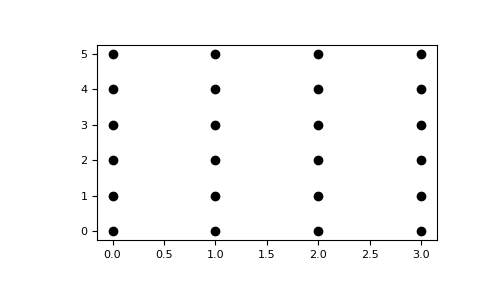
mgrid#
numpy.mgrid
>>> xx, yy = np.meshgrid(np.array([0, 1, 2, 3]), np.array([0, 1, 2, 3, 4, 5]))
>>> xx.T, yy.T
(array([[0, 0, 0, 0, 0, 0],
        [1, 1, 1, 1, 1, 1],
        [2, 2, 2, 2, 2, 2],
        [3, 3, 3, 3, 3, 3]]),
 array([[0, 1, 2, 3, 4, 5],
        [0, 1, 2, 3, 4, 5],
        [0, 1, 2, 3, 4, 5],
        [0, 1, 2, 3, 4, 5]]))

>>> np.mgrid[0:4, 0:6]
array([[[0, 0, 0, 0, 0, 0],
        [1, 1, 1, 1, 1, 1],
        [2, 2, 2, 2, 2, 2],
        [3, 3, 3, 3, 3, 3]],

       [[0, 1, 2, 3, 4, 5],
        [0, 1, 2, 3, 4, 5],
        [0, 1, 2, 3, 4, 5],
        [0, 1, 2, 3, 4, 5]]])
ogrid#
与 numpy.mgridnumpy.ogrid
这些稀疏坐标网格旨在与广播一起使用。当所有坐标都在表达式中使用时,广播仍然会导致一个全维度的结果数组。
>>> np.ogrid[0:4, 0:6]
(array([[0],
        [1],
        [2],
        [3]]), array([[0, 1, 2, 3, 4, 5]]))
这里描述的所有三种方法都可以用来在网格上计算函数值。
>>> g = np.ogrid[0:4, 0:6]
>>> zg = np.sqrt(g[0]**2 + g[1]**2)
>>> g[0].shape, g[1].shape, zg.shape
((4, 1), (1, 6), (4, 6))
>>> m = np.mgrid[0:4, 0:6]
>>> zm = np.sqrt(m[0]**2 + m[1]**2)
>>> np.array_equal(zm, zg)
True